


Crumb: Keeping Your Pets Safe
4.71.03K Reviews
App Specs
- Version
- 2.2.5
- Updated On
- License
- Free
- Downloads
- 100,000+
- Developer
- Crumb Pet
- Categories
- House & Home
- Platform
- Android
Screenshots
 Analysis by AppCompare
Have you ever been in that nerve-wracking situation where your pet dashed out the door, and you had no idea which way they went? Yeah, I’ve been there too. That’s why I decided to give Crumb: Keeping Your Pets Safe a try. This app promises to be the ultimate solution for pet owners who want to keep track of their furry friends, and I was eager to see if it lived up to the hype.
What I’d want to know before installing
When I’m deciding whether a pet-safety app is worth keeping, I start with a practical question: will it help with the situation I actually worry about, or just give me another screen to check? Crumb is aimed at people who want a community-based way to help lost pets get home, rather than a general-purpose home app. That focus makes it most relevant to owners whose animals sometimes slip through a gate, roam outdoors, or travel with different caregivers.
It’s a free app from Crumb Pet, and its Everyone age rating makes it accessible to households where several people may want to take part. The app has a 4.7 average from around 3,800 ratings, with over 100,000 installs. Those figures suggest that other pet owners have found it worth trying, but I’d still judge it by whether its tools match your routine. Its current version is 2.1.4, and it was released on April 22, 2025.
One useful way to approach any lost-pet tool is to think of it as one layer of a plan, not a guarantee. I’d keep a clear photo and current contact details ready, make sure the pet’s collar identification is readable, and agree with everyone at home on who should respond if an alert comes in. A community app is most helpful when the basic information is already in place and people know what to do next.
Getting Started with Crumb
The first thing I noticed about Crumb was how easy it was to get started. The app is available on both Android and iOS, so no worries about compatibility. After a quick download and set-up, I was ready to dive in. The interface is super user-friendly, with a clean design that doesn’t overwhelm you with options. It’s kind of like that friend who’s organized but not annoyingly so.
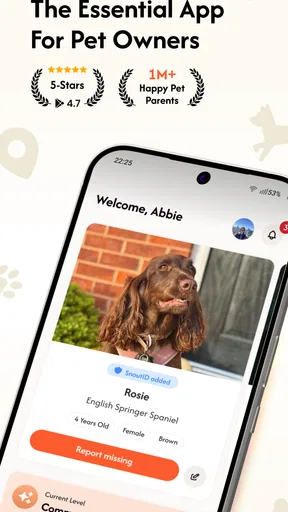
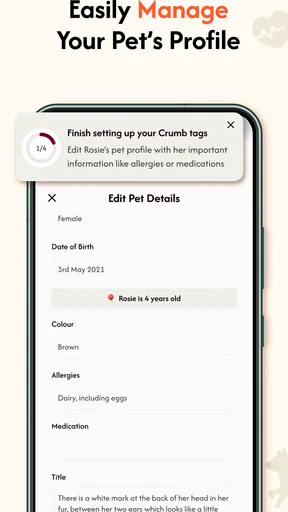
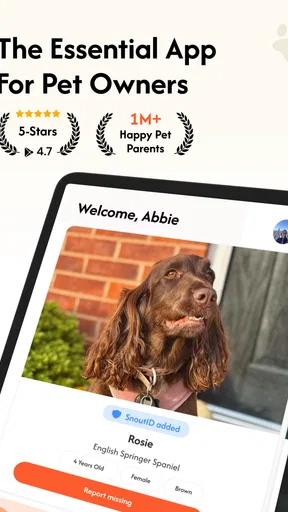
Once you’re in, you can create profiles for each of your pets. This includes adding a cute picture, their name, breed, and any other quirky details you love about them. It’s like setting up a Facebook profile, but for your pet. Honestly, it’s kind of fun, and it gives the app a personal touch.
Making a pet profile useful in a hurry
A profile is more than a place for a favorite photo when a pet goes missing. I’d choose an image that clearly shows the animal’s face and markings, then check that names and identifying details are spelled correctly. In a stressful search, people may only glance at a screen; a current, recognizable picture is more useful than a polished but outdated one. If several family members help with care, setting up each pet before there’s an emergency also avoids trying to remember details under pressure.
Worth Reading Before You Choose

EA SPORTS FC Mobile 26 Is a Bigger Football Game, but It Takes Time

Flipboard Shows What News Apps Must Do Beyond the Feed

Switching to Android Auto Means Rethinking Your Driving Routine

Google Calendar Makes a Crowded Week Easier to Manage

Ludo King Makes the Most of the Minutes Between Plans

Baby Panda World Brings Quick Play to Modern Phones, but Its Game Library Feels Busy
That preparation matters especially for pets that look similar to others in the neighborhood or have distinctive markings that are easy to overlook in a rushed description. I’d also review the profile whenever a pet’s appearance changes noticeably or contact information needs updating. The small effort of keeping those details current is a better use of the app than waiting until a search is already underway.
Tracking Your Pet's Whereabouts
The main feature of Crumb is its GPS tracking. You’ll need to attach a small GPS device to your pet’s collar, which syncs with the app. I tested it with my dog, Max, and was pleasantly surprised by the accuracy. The live tracking feature shows you exactly where your pet is, and it even provides directions to their location. I can’t tell you how reassuring it is to know exactly where Max is when he decides to chase after a squirrel.
Another cool feature is the geofencing option. You can set up safe zones, like your yard or the park, and get alerts if your pet wanders off. It’s like having an invisible fence that sends you a text instead of zapping your pet. I appreciate this non-invasive approach; it’s kinder and more humane.
Using location tools without overrelying on them
For a real-life example, imagine a dog slipping out while groceries are being carried inside. A location view and a prepared profile can give the household a starting point: one person checks the last known area while another contacts nearby people. That is a more useful response than everyone searching randomly. I’d still treat location as a clue rather than a promise of perfect, uninterrupted tracking; a device has to be attached and working, and the owner needs to be able to use the app when it matters.
Geofences are most helpful when the boundary reflects a place the pet genuinely knows, such as a yard or a regular walking area. I wouldn’t draw a zone so broadly that normal wandering becomes meaningless, or so tightly that routine movement creates constant distractions. A few carefully chosen boundaries are easier to act on than a flood of alerts. If your pet is always indoors and never wears a tracking device, this part of the experience may matter much less to you.
Keeping a History
Crumb doesn’t just track your pet in real-time; it also keeps a history of their movements. This feature is particularly useful if you want to look back and see where your adventurous kitty has been all day. It’s also a great tool for those who have pet sitters or dog walkers. You can easily monitor their routes and ensure your pet is getting the exercise they need.
I found this feature handy when trying to establish a routine for Max. Knowing his favorite hangouts helped me plan our walks better and avoid places he’d rather not go. Plus, having this data is pretty cool for any pet owner who’s curious about their pet’s secret life.
When movement history earns its place
History is most valuable when it answers a practical question, not when it becomes a reason to watch every walk. For example, if a pet seems unsettled after outings, seeing a familiar route can help you discuss the routine with a caregiver. If you share care with a dog walker, it can also support a calm, specific conversation about where the walk went, instead of relying on anyone’s memory. I’d use it as context, not as a way to judge a caregiver from a map alone; a route cannot show how the pet behaved or whether the outing met their needs.
There is also a trade-off here: location tools are only as useful as the information and habits around them. Agreeing with a sitter about who carries the tracker, who receives alerts, and who is responsible for returning it to the collar can prevent confusion. For a pet that stays home with one owner, movement history may be an occasional curiosity rather than a reason to install the app.
Community help and a backup identity
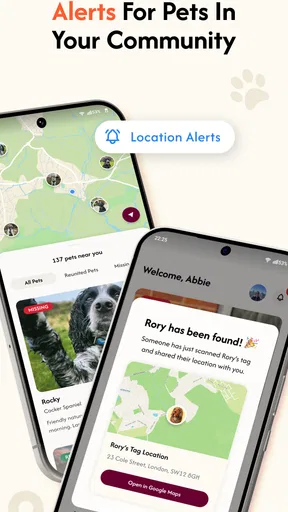
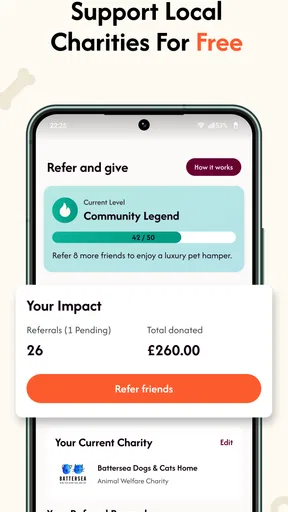
Beyond tracking, Crumb provides some neat safety features. There’s an alert button that you can press if you lose sight of your pet, sending out notifications to other Crumb users in the area to help you find them. It’s like having a neighborhood watch for pets, which I find comforting.
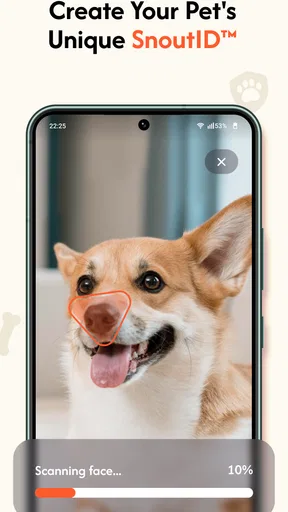
Moreover, the app offers a digital ID tag. If someone finds your lost pet and scans the tag, they’ll see your contact information. It’s a great backup in case your pet’s collar gets lost or damaged. I love that it encourages community involvement and provides a simple way to reunite lost pets with their owners.
The community approach has a clear strength and a clear limit. It can widen the circle of people who may notice a search, but it depends on local participation and on people seeing and acting on an alert. I’d use it alongside direct calls to nearby shelters, veterinarians, and neighbors rather than assuming an app notification reaches everyone who could help. The digital tag is similarly a backup, not a replacement for a physical tag: a finder needs to notice and scan it, while a readable collar tag can be understood at a glance.
How it compares with other ways to look for a pet
Compared with a basic pet-profile or record-keeping app, Crumb is more focused on location and the response to a lost pet. Compared with posting only on neighborhood social media, it brings pet details and a community alert into a dedicated setting. Those approaches can complement each other: a post may reach people who do not use Crumb, while a pet profile and tag give finders a direct route to identification.
A standalone GPS tracker may suit someone whose main priority is location hardware and who does not need a community layer. A simple ID tag may be enough for an indoor pet with little chance of wandering, while an owner who frequently travels with a pet may prefer a broader travel and care routine. I see Crumb as a better fit when the owner wants both a way to organize a search and a local network, not as a substitute for every other safety measure.
What to consider before making it part of your routine
One question I’d ask before relying on the tracking side is whether you’re prepared to use a GPS device on the pet’s collar. The app alone cannot provide that hardware-based location experience, so the device is an extra step and may be inconvenient for an animal that resists collars or wears specialized equipment. Before building a routine around it, make sure the setup works comfortably for your pet and that the people who care for them know how to keep it attached.
Another fair question is whether this is useful if nobody nearby uses the app. The community alert is more compelling where local participation exists, but it should not be your only search channel in any area. If your priority is simply to identify your pet when a stranger finds them, the digital ID can be a useful extra; if you need dependable location information as the central feature, consider whether a tracker-based approach suits your needs better. The right choice depends on the kind of risk you’re trying to reduce.
Switching to Crumb doesn’t have to mean abandoning existing habits. I’d keep using familiar neighborhood groups and physical identification, then add the app as another route for sharing a search. That gradual approach also lets you see whether its community features are active enough to be useful in your area before you depend on them. If you decide it doesn’t fit, the most important thing to carry forward is the prepared pet profile and a clear household plan.
Final Thoughts
Overall, I was impressed with Crumb: Keeping Your Pets Safe. The app delivers on its promise to keep your pet safe and offers peace of mind. It’s like having a guardian angel for your pet, always watching over them. Sure, you need to invest in a GPS device, but it’s a small price to pay for the security it offers.
If you’re a pet owner who worries about your pet’s safety, Crumb is definitely worth considering. The combination of GPS tracking, geofencing, and community alerts makes it a comprehensive tool for any pet parent. So, go ahead and give it a try. You might just find it’s the peace of mind you’ve been looking for.
My recommendation is strongest for owners who want to prepare before a scare, especially households with outdoor pets or several people sharing care. I’d be more cautious if your pet never wears a collar, if you mainly want a basic medical record, or if you expect an app to guarantee a reunion on its own. Used with current identification, a sensible search plan, and realistic expectations about local participation, Crumb can be a helpful part of keeping a pet safer. For me, that makes it worth considering—not because it removes every risk, but because it gives owners another organized way to respond when a pet is out of sight.
Pros
- Intuitive interface for easy navigation.
- Real-time location tracking of your pet.
- Customizable alerts for pet activities.
- Supports multiple pets under one account.
- Seamless integration with smart collars.
Cons
- Limited features in the free version.
- Requires constant GPS for accuracy.
- Battery drain on prolonged use.
- Subscription needed for premium features.
- Occasional app crashes reported.
FAQs for Crumb: Keeping Your Pets Safe
What is Crumb: Keeping Your Pets Safe?
Crumb is a mobile application designed to ensure the safety and well-being of your pets. It offers features like real-time location tracking, health monitoring, and reminders for vet appointments. The app aims to provide pet owners with peace of mind by ensuring their furry friends are safe and healthy at all times.
How does Crumb's location tracking feature work?
Crumb utilizes GPS technology to provide real-time tracking of your pet's location. By attaching a Crumb-compatible GPS device to your pet's collar, you can monitor their movements through the app. This feature is particularly useful for keeping track of pets that are prone to wandering or escaping.
Is Crumb compatible with all types of pets?
Crumb is primarily designed for common household pets such as dogs and cats. However, the app's tracking and health monitoring features can be adapted for other small animals with the appropriate GPS device. It is always advisable to check compatibility with your specific pet before purchase.
What are the subscription options for Crumb?
Crumb offers various subscription plans to fit different needs and budgets. Options range from a basic plan with essential tracking features to a premium plan that includes advanced health monitoring and personalized vet care reminders. Users can choose monthly or annual subscriptions based on their preferences.
How secure is my data on the Crumb app?
Crumb prioritizes user privacy and data security. The app employs encryption protocols to protect personal and pet data. Regular updates ensure adherence to the latest security standards. Users can be confident that their information is handled with the utmost care and is not shared with third parties.


